
Install required libraries (for 64-bit system)
Skype website only provides 32-bit package for Ubuntu 12.04 and higher. You’re unable to install it directly on 64-bit system due to dependencies issue.
However, install the old skype from Canonical partners repository will also install the required libraries we need for NEW skype.
Follow steps a, b, c mentioned below :
a.) Press Ctrl+Alt+T on keyboard to open terminal. When it opens, run commands one by one to remove old skype and .skype folder:

c.) Press Ctrl+Alt+T on keyboard to open terminal. When it opens, run the commands below to install old skype:
Skype website only provides 32-bit package for Ubuntu 12.04 and higher. You’re unable to install it directly on 64-bit system due to dependencies issue.
However, install the old skype from Canonical partners repository will also install the required libraries we need for NEW skype.
Follow steps a, b, c mentioned below :
a.) Press Ctrl+Alt+T on keyboard to open terminal. When it opens, run commands one by one to remove old skype and .skype folder:
sudo apt-get remove skype skype-bin

rm -rf ~/.skype
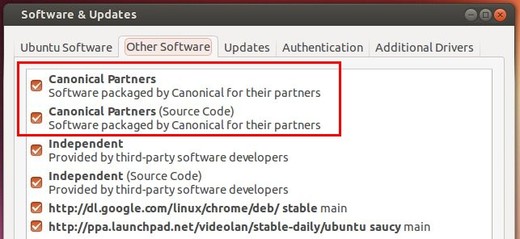
b.) Open “Software & Updates” and enable Canonical partners repository under Other Software tab.
c.) Press Ctrl+Alt+T on keyboard to open terminal. When it opens, run the commands below to install old skype:
sudo apt-get update; sudo apt-get install skype
For more details check : link
Comments